
SAP Identity Management Solutions
SAP combines several of its solutions to provide multiple series of IAM Solutions. One of those solutions is SAP Identity Management (IDM), which is nearing its End of Life (EOL). This blog mainly focuses on the suite of Solutions, along with SAP IDM, that SAP provides, and on understanding their functions, architectures, and integrations better for the user’s benefit. Let’s take a closer look at SAP Identity Management.
The following are some of the key capabilities under the SAP Identity Management Solution being offered by SAP:
Centralized Role-Based Identity Management
Instead of managing permissions for each user across all applications, SAP Identity Management Solutions uses Role-based Access Control (RBAC). Roles are defined once, with permissions grouped into business roles that map job functions (e.g., HR Manager, Finance Analyst) to technical authorizations via RBAC. These roles are assigned to users rather than individual permissions, reducing complexity and increasing operational efficiency. Administering these roles through a centralized system not only reduces permission creep but also enables easier audits and access reviews by providing a single source of truth.
Provisioning User and Access Data
SAP Identity Management Solutions automate user account creation, modification, and deprovisioning, and manage access rights across connected systems, including SAP S/4HANA, SuccessFactors, and non-SAP applications. Automated workflows trigger account creation and access assignment based on HR events, such as hiring, transfers, and terminations. SAP IDENTITY MANAGEMENT (IDM) SOLUTIONS ensures that user data and access permissions are accurately synchronized across connected systems, with a clear audit trail for compliance.
Heterogeneous System Landscape Support
Modern enterprises use not only SAP but also a mix of on-premises systems (e.g., Active Directory and SQL databases), third-party SaaS applications (e.g., Salesforce and ServiceNow), and cloud platforms (e.g., Azure and AWS). SAP Identity Management Solutions uses prebuilt connectors for common systems and standard protocols, including SAML, OAuth 2.0, SCIM, and OpenID Connect, to serve as a unified identity governance solution across the enterprise ecosystem. Identities remain consistent whether the user logs in to an on-premises database or a cloud-based HR portal.
Control of Identities (Employees, Contractors, Customers, Partners)
SAP Identity Management Solutions manages different identity types with different access rules and lifecycles; it is not just for internal staff. Employees’ lifecycles can be managed from onboarding through offboarding by integrating with the HR system as the authoritative source of truth. Contractor’s access can be managed with time-bound, limited-resource access that automatically expires or extends based on workflow approvals. Self-registration with email verification enables customers to create their accounts, manage their data privacy consents, and obtain the required access to customer-facing portals and services. Federated identities, supported by SAML or OAuth, enable partners to access required resources within controlled trust boundaries.
Unified View of Virtual Identities
An individual might have an account in the HR system, another in the Finance system, and a third in the CRM. SAP Identity Management Solutions consolidates multiple identities into a single logical view by linking them to a single source of truth. It provides a 360-degree view of what a single employee with multiple identities across different systems can do within the company by consolidating all identities into a single profile.
Authentication and Authorization Based on User Roles
Access decisions are driven by roles rather than individual profiles, enforcing security and compliance through uniform access control and strong authentication. While authentication and authorization are often used interchangeably, SAP IDENTITY MANAGEMENT (IDM) SOLUTIONS treats them as distinct steps:
Authorization: After successful authentication, authorization determines what a user can do based on the assigned roles and privileges. SAP IDENTITY MANAGEMENT (IDM) SOLUTIONS also supports adaptive authentication based on risk factors, such as location, device, and behavior, as well as attribute-based account control for dynamic decision-making.
Authentication: verifying who you are with a primary factor, such as username/password or biometrics or SSO, and afterward multi-factor authentication, such as email or SMS.

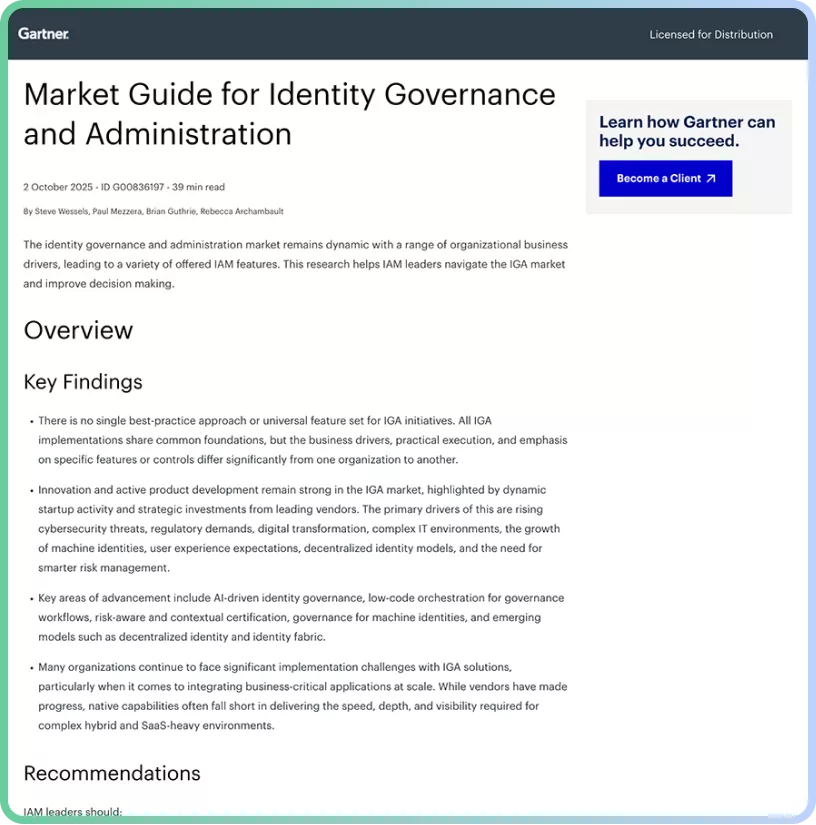
Access the 2026 Gartner Market Guide for Identity Governance and Administration (IGA)
Digital Representation of Persons in a Company
SAP Identity Management (IDM) Solutions creates a comprehensive digital profile of a user that accurately reflects an individual’s organizational relationship, responsibilities, and access needs. This representation includes their name, employeeID, email, phone number, address, department, reporting line, cost center, location, and job title. Technical attributes, such as network logins, system accounts, certificates, and permissions across systems, are defined based on business roles and responsibilities. The user profile serves as the foundation for access control, workflows, and compliance requirements.
Data Sovereignty and Quality
SAP Identity Management Solutions ensure that identity data is accurate, up-to-date, secure, and compliant with industry regulations, i.e., SOX, HIPAA, and GDPR. It defines authoritative sources for each identity attribute, i.e., the HR system for employee data and Active Directory for permissions, to maintain data consistency through validation and synchronization. Master data governance ensures consistency across systems, and conflict-resolution rules maintain data quality and prevent duplicate or ghost accounts.
Management of Multiple Identities Across Systems\
Users often require separate accounts in different systems, such as Development, Testing, Staging, and Production environments. SAP IDENTITY MANAGEMENT (IDM) SOLUTIONS manages identities across different environments, including cloud, on-premises, and hybrid. It ensures that users with multiple roles do not gain administrative privileges in production environments and keeps privileged accounts separate from standard accounts. SAP IDENTITY MANAGEMENT (IDM) SOLUTIONS ensures complete lifecycle management of multiple identities, provides audit trails across account types, and provides comprehensive risk assessments.
User Lifecycle Coverage
SAP Identity Management Solutions covers the entire user identity lifecycle, from onboarding to offboarding, including the Joiner, Mover, and Leaver processes.
- Joiner: Automated onboarding process of a new hire, from account creation to access assignments.
- Mover: As a user Role updates, workflows automatically change permissions based on the new role.
- Leaver: Immediate and complete access revocation when a user is terminated.
SAP Identity Management (IdM) Functionality
Central User Provisioning
Centralized provisioning is the core capability of SAP IdM, allowing organizations to automate user creation, modification, and deletion across connected systems from a single point of control. SAP IdM connects to authoritative sources, such as SAP HCM, SuccessFactors, and Active Directory, and automatically distributes identity data to all target systems. This eliminates manual account administration, reduces errors, and ensures consistent identity data across the IT landscape. When employees join, change roles, or leave the organization, provisioning workflows trigger automatically based on HR system data or manual requests.
Approvals Workflow
SAP IdM embeds governance directly into access provisioning by enforcing approval workflows for access requests. Automation doesn’t compromise security controls; SAP IdM ensures that access is not granted without proper evaluation and that an audit trail is maintained.
Web-Based Workflow for Access Rights Management
SAP IdM provides a browser-based interface where employees can request specific permissions or roles via a service portal, and managers or resource owners can review and approve requests. It also supports multi-step approval processes: managers approve requests first, then the system owner, and finally the compliance owner, ensuring full transparency and a complete audit trail for each access request. Requestors can monitor the status in real-time, while approvers receive a consolidated view of the pending request with relevant context about the user and the requested permission.
Business Rules and Policies for Access Control
SAP IdM can enforce organizational policies through automated rule evaluation for access control workflows. Approval paths are driven by configurable business rules, including policies that enforce segregation of duties (SoD), role eligibility, risk-based approvals, and time-based restrictions. For example, if a user is in the finance department, they cannot be granted “Vendor Payment” rights without CFO approval.
Rules- and Roles-Based Provisioning
SAP IdM uses logic-driven provisioning instead of manual decisions. Rules determine when access is assigned; roles define what access is granted; and contextual information enables conditional provisioning based on location, job role, and department.
Assigning Privileges Using Roles
Business roles bundle technical privileges that align with their job functions. Instead of assigning individual technical permissions, administrators assign roles such as “Sales Manager” or “Finance Analyst” that include all necessary permissions. Roles can include access across multiple systems, making provisioning efficient and standardized.
Password Management
One of the major cost factors for IT helpdesks is password generation and resets. SAP IdM automates this process by centralizing credential handling across systems.
Password Provisioning
When a new account is created, IdM generates a secure initial password and distributes it via a secure channel, e.g., encrypted email or a one-time-use password enforced by a password change policy. Supports password complexity requirements and automated password setting during bulk user imports.
Password-Reset Self-Service
Users can reset their forgotten passwords by answering security questions or by using multi-factor authentication (MFA) via web portals. Users can create new passwords without helpdesk intervention. This functionality reduces IT support costs, minimizes downtime, and provides 24/7 availability.
Password Synchronization Across Target Systems
Maintains consistent passwords across multiple connected systems by synchronizing passwords. When a user changes their password in one system, such as Active Directory, the change propagates automatically to other connected systems, such as Microsoft Entra ID. This reduces password fatigue by requiring users to remember fewer passwords, and the system ensures that password security policies, such as complexity and expiration requirements, are enforced consistently across the system.
Audit and Monitoring
In industries with strict compliance requirements, being secure is not enough; you must provide evidence that your systems are secure and compliant.
Centralized Reporting for Compliance and Auditability
SAP IdM consolidates identity and access data for compliance reporting and audit trail by maintaining a history of every change. Admins can generate reports on user access rights, role assignments, provisioning activities, and policy violations across all managed systems. Auditors can verify who had access to sensitive systems throughout the audit period. SAP IdM supports the regulatory requirements of SOX, GDPR, HIPAA, and ISO 27001 through prebuilt and customizable reports.
Standards-Based Support for Identity Federation
As organizations grow and move to the cloud, identities need to be securely integrated across applications and service providers. SAP IdM supports SAML 2.0, OAuth 2.0, OpenID Connect, and LDAP to seamlessly integrate identities across organizational boundaries.
Cross-Company Identity Management Scenarios
Using standards such as SAML 2.0, SCIM, OAuth, and OpenID Connect, SAP IdM manages identities for partner organizations and B2B identity scenarios. Allows federated identity providers to authenticate users while the local IdM system manages authorization.
Integration with SAP Single Sign-On
SAP IdM manages user accounts and integrates with SAP SSO solutions to provide a unified authentication experience. Users authenticate once and gain access to multiple SAP and integrated applications without re-entering their credentials.
SAP Identity Management IdM Architecture and Components
Identity Center
The Identity Center is the heart of the SAP IdM architecture and serves as a central control point for managing workflows, tasks, data processing, and governance across the enterprise.
Primary Component for Identity Management
Identity Center handles the execution of provisioning tasks, such as user lifecycle management (joiner, mover, and leaver scenarios), role management and permission assignments, and processes business logic through workflows and approval chains. Here, admins can also manage authentication and authorization policies, configure synchronization rules between connected systems, and perform compliance-related activities such as audits and reporting.
Centralized Repository (Identity Store)
The Identity Center contains a centralized Identity store, a database that stores all identity-related information and serves as the single source of truth. It stores comprehensive user profiles, including personal data, organizational attributes, and employment details, and maintains role definitions, such as business roles mapped to technical privileges. Identity store tracks identity relationships and activities, with audit trails for compliance.
Uniformed Data View
The Identity Center provides a uniform, normalized view of identity data from multiple source systems. For example, the HR database might identify a user by the unique attribute “Employee ID”, whereas the IT system identifies users by the attribute “UserName.” Identity Center maps these formats into a single, consistent schema. Identity center eliminates data silos, duplicate records, and administrators manage a user once, and the changes are synchronized to all connected systems in respective formats. The uniform data view enables easy role modeling and access analysis, with consistent policy management across systems. As a result, administrators and auditors see one coherent identity profile per user, regardless of how many backend systems are involved.
Virtual Directory Service
The Virtual Directory service is a high-performance middleware component that enables SAP IdM to interact with multiple identity data sources without copying or replicating all data.
Logical Representation of Disparate Data Repositories
VDS provides a logical abstraction layer over multiple, physically separate data repositories, such as LDAP Directories, RDBMS systems, SAP Systems, and external identity stores. Instead of replicating all data into a single physical directory, VDS connects to these systems and presents them as a single logical directory. When an application queries the VDS, it fetches data from the source in real time, transforms and maps attributes across different schemas on the fly, and returns the data to the application in a standard format. This reduces data redundancy while still allowing centralized identity processing.
Virtual Directory Tree
The VDS constructs a virtual directory tree that behaves like a traditional directory structure but is dynamically assembled from multiple backend systems. This unified virtual directory tree merges organizational units, groups, and user entries from multiple sources, supports custom tree structures independent of source-system layouts, and enables navigation and queries as if the user were accessing a single directory. For example, user identity attributes may come from an HR system, while authentication-related attributes come from Active Directory, all appearing as a single virtual user object.
Controlled Information Access
VDS enforces security policies on virtual directory access and provides granular access control based on the requester’s identity and attributes. Admins can filter sensitive attributes by permissions, implement read/write data access based on system trust levels, and the source provider’s type. By controlling how identity data is accessed, VDS ensures compliance with data security and privacy policies and maintains audit logs of all attribute-level access attempts.
SAP Cloud Identity Services
SAP Cloud Identity Services serve as the central nervous system for identity and access management (IAM), enabling organizations to securely, centrally, and compliantly manage identity activities across SAP and non-SAP environments. It is designed to support modern cloud, on-premises, and hybrid enterprise infrastructure.
Supporting Cloud and Hybrid Environments
SAP Cloud identity services support SAP and non-SAP applications across different cloud providers. Hybrid identity federation enables organizations to keep user identities on-premises while authenticating users to cloud applications. It supports integration with non-SAP identity providers such as Microsoft Azure AD or Okta, allowing users to use their corporate credentials to access SAP resources seamlessly. These flexible support mechanisms allow organizations to modernize identity management incrementally without disrupting their existing identity infrastructure.
Audit Reports and Compliance Support
SAP Cloud Identity services provide built-in capabilities to support security audits, regulatory compliance, and governance requirements. Audit logs provide detailed tracking of every authentication event, user provisioning actions, authorization changes, and administrative activities. Reporting dashboards make it easier for stakeholders, such as executives, security teams, help desks, and auditors, to gain full visibility into who accessed what, when, and how. Reports and audit data can be exported in standard formats for external stakeholders’ analysis and regulatory submissions.
Capabilities
Authentication and Single Sign-On (SSO)
SAP Cloud Identity services support SAML 2.0, OpenID Connect, OAuth 2.0, multi-factor authentication, risk-based authentication, and comprehensive password policies across SAP and non-SAP applications. The goal is to have a single set of credentials with strong password hygiene, and to have the user log in to the identity management service once with multi-factor authentication, granting access to all authorized applications.
Policy-Based Authorization Management
Centrally defined policies drive authorization events, and access is not just “yes” or “no”; it can be configured based on conditions. Using Attribute-based access control (ABAC), dynamic authorization decisions are made based on user attributes, the user’s network context (corporate or public), and device status. Role-based access control maps business functions to specific roles, and users are assigned roles with fine-grained access controls at the application and data levels to ensure least-privilege access to resources.
Identity Repositories
Identity repositories act as the source of truth. It stores user profiles, attributes, and group membership information. Identities are continuously synchronized from primary sources such as Active Directory, HR systems, and Azure AD to ensure identity repositories are always up to date and provide consistent identity data across applications.
Secure System and Data Access
Security controls are embedded into every layer of SAP Cloud Identity services. Strong authentication mechanisms, including multi-factor authentication and adaptive authentication, ensure that even if credentials are stolen, data remains protected. API access is secured with token-based authentication; sessions are secured with TLS encryption and a secure tunnel between cloud and on-premises systems; and a zero-trust architecture reduces the risk of unauthorized access or credential misuse.
Consistent Mechanisms
User Authentication
Instead of each application having its own login screen and security logic, SAP Cloud Identity Services provides a unified login page with consistent branding and a consistent user experience across all integrated applications. Standard protocols ensure a consistent login process across applications, including centralized password reset, account unlock, security questions, and device registration.
User Provisioning
An identity provisioning service automates the user lifecycle, including joiners, leavers, and movers. Immediately creates users when they join the organization, updates their roles as they move across the organization, and revokes access when they leave, all instantly.
Roles Assignment
Complex roles are built from reusable role templates mapped to business functions, and users are assigned roles via group membership. Roles with temporary access can be created to allow temporary elevated access with a multi-level approval workflow, and access automatically expires after the defined period. It reduces privilege creep by preventing users from retaining permissions they no longer need.
Authorizations Management
Centralized control with granular permission management enables organizations to define what users can do within an application, including read, write, and delete permissions. Organizations can define policies to detect and prevent conflicting authorization combinations (e.g., segregation of duties [SoD]), implement emergency access procedures with a full audit trail, and automate the removal of unused permissions to ensure the principle of least privilege. Authorization reports provide visibility into who has access to which resources, enabling easier governance, access reviews, and continuous compliance monitoring.
Centralized User Account Management
SAP Identity services provide a single, centralized control point for unified administration of user accounts across the enterprise.
Administrative console: provides a single interface for user provisioning, role assignment, policy configuration, workflow configuration, bulk operations such as data import and export, and bulk data updates.
Reporting Dashboards: provide a clear overview of the entire identity landscape, reflecting the status of identities (active, locked, disabled) and authentication and authorization activities.
Self-service portal: user can manage their profile, passwords, MFA devices, and consent mechanisms independently.
SAP IdM Solutions and Integration
SAP Business Suite Integration (e.g., SAP ERP HCM)
SAP Identity Management integrates with SAP Business Suite applications, such as SAP ERP Human Capital Management (HCM), to automatically synchronize identity and user provisioning data. Changes in HCM automatically trigger user creation, modification, or account deactivation during hiring, transfers, and terminations. Organizational hierarchies, positions, and reporting relationships are synchronized and kept up to date; business roles are assigned based on user attributes, such as job title, department, and cost center. SAP IdM ensures that identity attributes such as name, email, job title, and employeeID remain consistent across SAP systems.
Integration with SAP Business Warehouse (Depending on Release)
Using the SAP ABAP or SAP User Management (UM) connectors, SAP IdM can be integrated with various SAP BW versions. SAP IdM can synchronize Identity, role assignments, and access data into SAP BW for advanced auditing and historical reporting. Compliance reporting can track who had access to what at any specific point in history, and trend analysis can visualize identity growth, user access patterns, and application license utilization over time.
Integration with SAP Access Control (Depending on Release)
SAP IdM can be integrated with SAP Access Control to extend identity governance for risk detection and remediation capabilities. IdM provides user and authorization data to Access control for Role designing according to risk rules and ensures that role assignments don’t violate the organization’s policies, such as segregation of duties. Access control can trigger remediation workflows in IdM based on risk exceptions, and together they maintain a stronger compliance posture aligned with enterprise risk models and centralized governance policies.
SAP Cloud Identity Solutions
Identity Authentication Service (IAS)
The SAP Cloud Identity provider service handles user authentication, including multi-factor authentication, adaptive authentication, SSO, social logins, and corporate Identity providers. With branded, unified login screens across all integrated applications, it provides a seamless experience.
Identity Provisioning Service (IPS)
Identity Provisioning Service automates user provisioning and lifecycle synchronization between source and destination identity providers for both cloud and on-premises applications.
SAP Cloud Identity Access Governance (IAG)
Workflow Management
Customizable workflows enable a configurable approval process for access requests, including when a request should trigger and when it is auto-approved based on predefined criteria. Multi-level approval support allows sequential and conditional approval chains. Tracking workflow requests for both requestors and helpdesk with notification via email.
Risk Checks
Real-time analysis of access requests against risk policies before approval, such as segregation of duties, compliance requirements, and pre-configured rules. Continuous monitoring for risk assessment of existing access rights with a complete audit trail of activities that may link to identified risks.
Emergency Access Management
SAP Cloud IAG provides firefighting capabilities for cloud systems, enabling time-bound, elevated access with full audit logging to address emergencies. Privilege sessions can be tracked and monitored during emergency access, and post-access documented reviews can fulfil regulatory requirements as well.
SAP Access Control
Risk Identification and Minimization
Centralized risk repository to maintain risk rule sets after scanning user roles and permissions to identify segregation of duties and critical actions that may violate risk policies. Risk simulation to analyze what-if scenarios for access changes, cross-system risk analysis, and managing mitigation activities with compensating security controls.
Workflow Automation
Automated workflow routing to multi-level approvers based on request type, risk level, and the organization’s rules, with support for automatic escalation for overdue approvals. Integration with external workflow systems and SLA tracking with comprehensive reports on approval cycle times.
Access Request Management (ARM)
Self-service portal where users can request access, including single or multiple roles in a single request, and the request then follows a compliant approval process. ARM suggests appropriate roles for end users based on user attributes, and users can track their access requests.
Access Risk Analysis (ARA)
ARA provides compliance reports after periodic analyses of users’ access rights and identifies SoD conflicts and policy violations. It supports user access certification campaigns, assigns risk scores to access-right combinations, and provides a historical view of the compliance posture over time.
Emergency Access Management (EAM)
EAM manages temporary privileged accounts access with comprehensive logging of all actions performed during emergency access. Designates oversight personnel to monitor emergency access sessions with system-enforced expiration of emergency privilege and generates audit-ready reports after emergency sessions.
Business Role Management (BRM)
It provides tools to create and maintain business roles, analyzes user business authorization, and suggests role definitions. Simulates roles to detect risks before deployment and simplifies the role lifecycle with versioning and change control for role definitions.
SAP Single Sign-On
End-to-End Authentication (SAP and Non-SAP)
SAP Single Sign-On provides an enterprise-level authentication solution that enables seamless access across SAP and non-SAP systems. Eliminates password prompts for end users and provides a unified login experience, allowing users to authenticate once and access all integrated systems. It supports Kerberos integration, SAML 2.0, smart card authentication, Biometric integration, Mobile SSO, and SSP for older SAP systems.
Benefits of SAP IdM
Increased Security
Security is a primary driver for implementing SAP IdM. By centralizing and automating identity management processes and removing human error, organizations significantly reduce identity-related risks.
Compliance and Automation of Identity Lifecycle
SAP IdM automates the identity lifecycle from employee onboarding to offboarding. When employees join, change roles, or leave the organization, the system automatically provisions or deprovisions access rights based on pre-defined rules and policies. This eliminates delays in revoking access for employees moving within the organization or leaving. The system automatically enforces segregation-of-duties rules and ensures access compliance based on the employee’s actual business status.
Central Management of Access Data
Instead of managing identities across different systems, all user access rights, roles, and permissions across SAP and non-SAP systems are managed from a centralized access management system. Administrators can view all users’ access footprints, which helps prevent shadow IT, orphaned accounts, and standing privileges.
Minimized Duplicate Administration
Without centralized administration, each system requires manual configuration, which can lead to redundant accounts and policies and result in conflicts. With SAP IdM, users are created once and automatically provisioned across all connected systems, reducing administrative overhead and ensuring consistent policy enforcement.
Secure Passwords
SAP IdM enforces global password policies uniformly across all managed systems, which ensures minimum length, complexity, and expiration requirements. The system provides self-service password reset functionality to reduce helpdesk load while maintaining security through security questions and multi-factor authentication.
Accelerated Provisioning
Faster User and Authorization Provisioning
With role-based access control (RBAC), identities are provisioned based on business attributes, such as department value, in a single action rather than individually across systems. As soon as the user appears in the HR database, configured workflows or scheduled jobs create the user account in the connected systems, assigning appropriate roles and access rights.
Reduced Manual Effort
Automation of User Management Tasks
Repetitive tasks such as user provisioning, password resets, account unlocks, account disablement, role assignments, and access reviews are automated. Administrators are free to focus on strategic tasks such as forensic investigations, orchestration, and remediation plans.
Improved Data Quality
Centralized Maintenance from Leading Sources
Accurate identity data is critical for security, governance, and compliance, and data inconsistencies are a major cause of system errors and audit failures. SAP IdM serves as a hub that synchronizes accurate identity data across connected systems, including SAP ERP HCM, SuccessFactors, and Active Directory. Data validation rules ensure that only complete and accurate information is synced and prevent errors in business processes.
Enhanced Compliance
Fulfillment of Reporting Requirements
Auditors require evidence that “who has access to what”. IdM provides that evidence through its built-in reporting and analytics, which provide real-time visibility into access rights across the identity landscape. Administrators can generate reports showing who approved a specific role, when it was assigned to an identity, and why, making the audit season less painful.
Cost Reduction
Identity lifecycle automation directly improves operational efficiency and project costs. While the initial setup requires investment, the long-term return on investment makes the effort worthwhile.
Reduced Project Duration
During new system implementation or migrations, automated processes such as bulk user creation and provisioning can bring down project duration. Rather than starting from nothing, reusable workflow templates and approval processes reduce configuration time. IdM’s ability to handle both SAP and non-SAP applications eliminates the need for multiple identity management solutions.
Consistent IdM Operation
Standardized identity management across all connected systems and applications reduces training costs and improves operational efficiency. A unified platform means a single set of skills for administrators rather than expertise in multiple tools. Lower complexity leads to fewer support tickets, less downtime, and a more predictable IT budget.
SAP IdM Implementation and Optimization
Since SAP announced the end of maintenance for SAP IdM at the end of December 2027, though extended support will be available until 2030, organizations are investing in both maintenance and strategic transformation by optimizing their existing setup and developing transition strategies to modern platforms such as SAP Cloud Identity Services or Microsoft Entra ID.
Transformation Package for SAP IdM Replacement
Standardized Migration to New IdM Solution
A transformation package provides an end-to-end migration approach from SAP IdM to modern Identity management platforms. This includes predefined migration strategy templates, phased transition planning, data migration frameworks, parallel operation periods, and risk mitigation strategies to ensure that the logic built into SAP IdM is translated efficiently into the new solution.
As-Is Analysis
A comprehensive assessment of the current SAP IdM environment is required, including documentation of existing workflows, identity stores, provisioning rules, custom developments, system integrations, user roles, and business processes. This phase helps identify redundant processes, technical debt, and opportunities for process optimization.
Functionality Implementation
Once the target solution is defined, core functionalities are reimplemented, including user lifecycle management, automated provisioning/deprovisioning, approval workflows, access request processes, password management, and business rule engines. The focus should be on replacing custom logic with standard functionality where possible, simplifying overly complex workflows, and increasing automation levels.
System Connections
Re-establish secure connections to target systems such as S/4HANA, SuccessFactors, and Active Directory using updated mechanisms, including native connectors, APIs, and Web Services, to enable automated identity data exchange and provisioning.
Complete Rollout
The final phase starts with data and configuration migration, followed by pilot testing, and then staged rollouts at the regional or departmental level. Important points at this stage include user training, communication plans, efficient help desk support, performance monitoring, and a swift handover to the operations team.
Microsoft Entra Fit Check
Many organizations are evaluating Microsoft Entra ID as a potential successor to the Identity Governance and Administration (IGA) solution.
Assessing Suitability as an IGA System
Evaluate if MS Entra governance features, such as Access Reviews, Entitlement Management, role mining, and privileged access management, can handle complex SAP roles.
Technical Feasibility
Verify whether the MS Entra provisioning mechanisms can bridge gaps across SAP ABAP systems, hybrid identity management scenarios, connector availability for non-Microsoft systems, and integration with SAP S/4HANA.
Licensing Considerations
Analyze the licensing cost of Microsoft Entra Licensing tiers, i.e., P1, P2, and add-ons. This includes features availability by license, cost per user, and comparison with alternative solutions.
Connectors
Central Unit Communication with Connected Systems
Connectors are the functional component of the IdM system, enabling the central unit to communicate with connected systems with different architectures. Connectors such as SOAP, OData, and LDAP translate IdM commands into a format the target system understands.
Automatic Provisioning of Users (Onboarding and Offboarding)
Connectors ensure that, when a new hire event occurs, the account is created in target systems in real time, with correct attribute mappings and transformation rules. In the event of any employee leaving the organization, connectors ensure that the respective accounts are locked and that assigned roles are removed across connected systems.
How Pathlock Can Help with SAP Identity Management?
With SAP Identity Management (IDM) reaching end-of-maintenance in 2027, organizations must replace a foundational identity administration component that many SAP environments rely on for provisioning, workflow, and access lifecycle management. For large enterprises, this is not simply a tool replacement – it requires rethinking how identity and access are managed across complex SAP landscapes.
Pathlock provides a modern, SAP-native identity governance and administration platform designed specifically to address this transition.
Replace SAP IDM Without Losing Critical Functionality
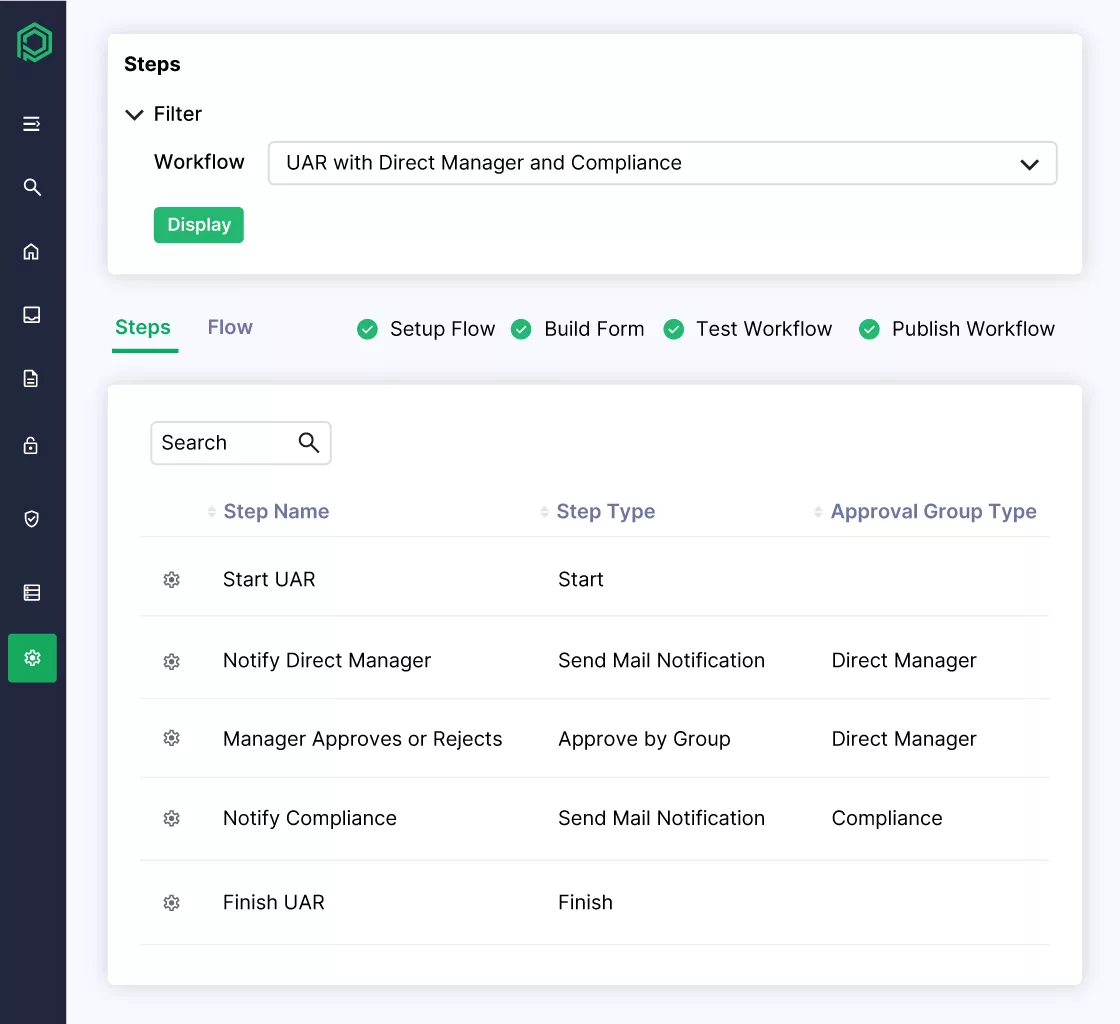
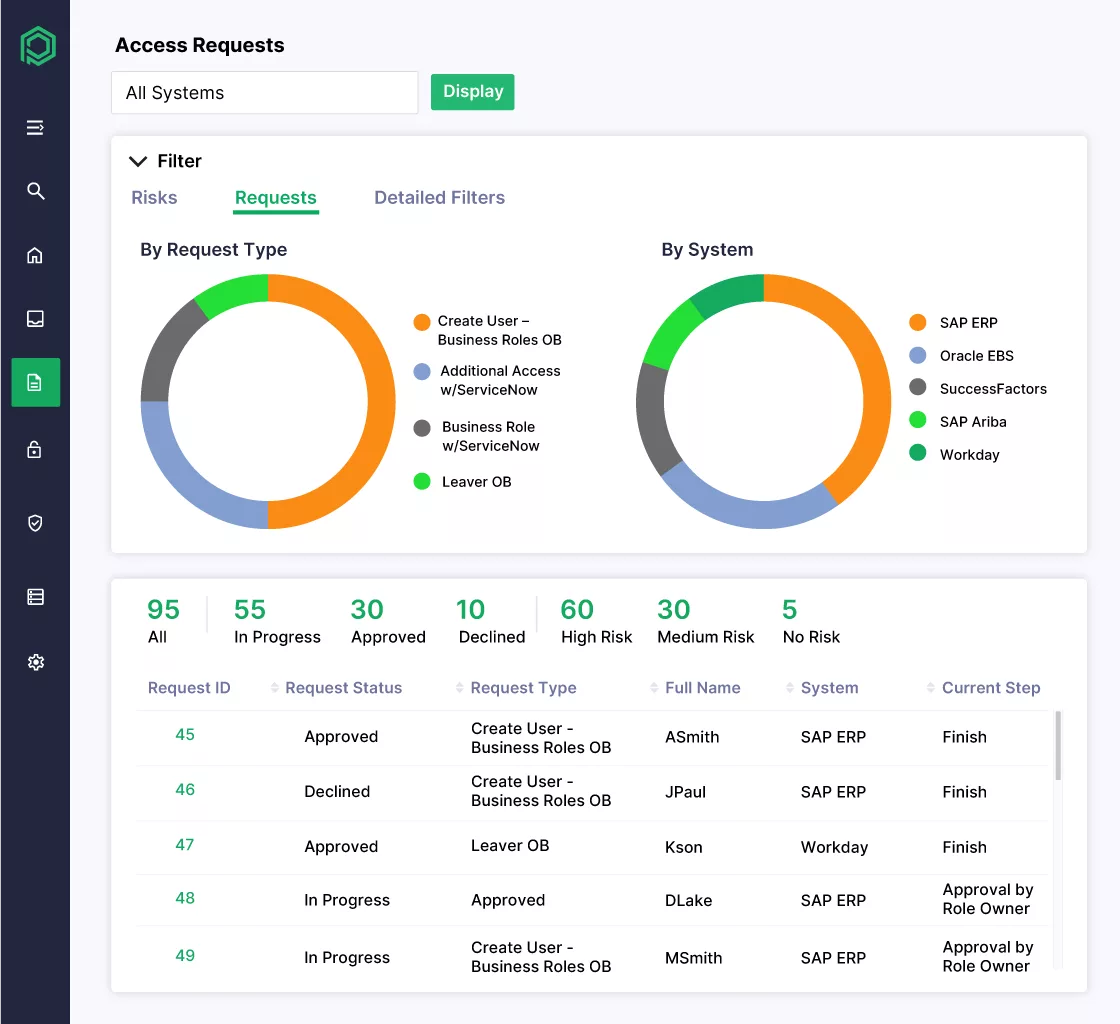
Many SAP IDM deployments support essential processes such as user provisioning, joiner-mover-leaver (JML) workflows, role management, and approval processes. Pathlock replaces these capabilities with standardized, configurable workflows that eliminate the heavy customization many organizations built into IDM.
With Pathlock, organizations can modernize identity lifecycle management while maintaining the operational processes their business depends on.
Simplify Identity and Access Architecture
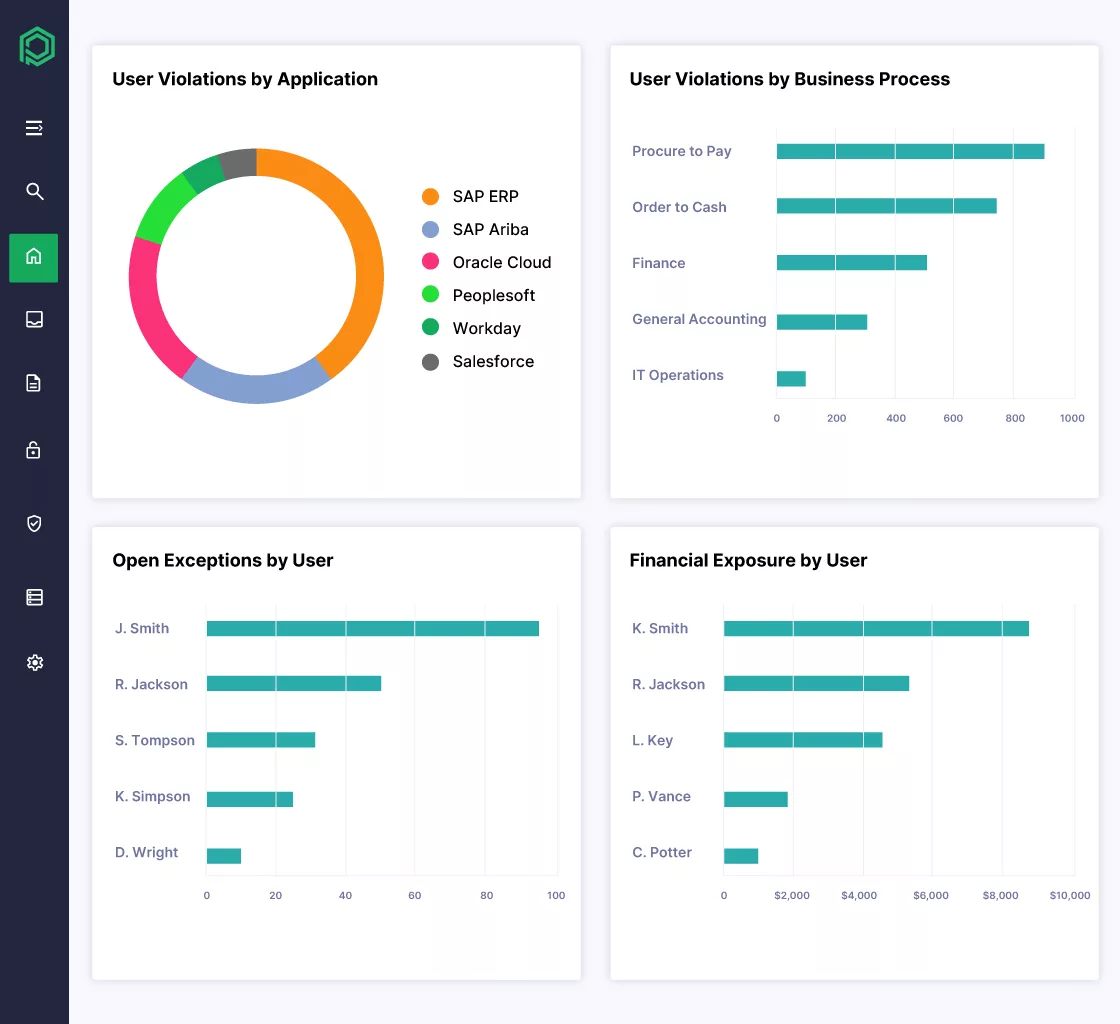
SAP IDM environments are often combined with multiple additional tools such as SAP GRC, identity governance platforms, and custom integrations. Pathlock consolidates these capabilities into a single unified platform that delivers identity governance, application access control, and compliance monitoring together.
This unified architecture helps organizations:
- Reduce tool sprawl and integration complexity
- Lower licensing and operational costs
- Streamline identity and access governance processes
Deliver SAP-Native Governance at Enterprise Scale
Generic identity governance tools often lack deep awareness of SAP authorization. Pathlock is designed specifically for SAP environments, with native support for authorization objects, roles, profiles, and transactions across systems such as SAP ECC and S/4HANA.
This SAP-native approach enables organizations to:
- Govern complex SAP authorization models
- Automate provisioning across multiple SAP systems
- Maintain strong compliance and audit controls
Enable Seamless Migration from SAP IDM
Replacing IDM can be risky because many enterprises rely on it to support automated provisioning and critical business processes. Pathlock provides a structured migration approach that preserves workflows and maintains operational continuity during the transition.
This phased approach allows organizations to modernize their identity infrastructure without disrupting day-to-day operations.
Future-Proof Identity Governance
As SAP environments evolve toward hybrid and cloud architectures, organizations need identity governance that can scale across both SAP and non-SAP systems. Pathlock’s cloud-native platform delivers the performance, scalability, and flexibility required for modern enterprise environments.
By replacing SAP IDM with Pathlock, organizations gain a future-ready identity governance layer that supports SAP transformation initiatives while strengthening security, compliance, and operational efficiency.