
SAP IAM is designed to secure, govern and streamline digital Identities across SAP and non-Sap environments. Its primary objective is to ensure that right users have the right access to the right systems at the right time and for the right reasons.
Centralized Role-Based Identity Management
Instead of managing permissions for every individual user across every single application, SAP IAM uses Role-based Access control (RBAC). Roles are defined once with grouping of permissions, business roles map job functions e.g. HR Manager, Finance analyst, to technical authorization with RBAC Roles. These roles are assigned to users rather than individual permissions assignment which reduces complexity and increases operational efficiency. Administering these roles from a centralized mechanism not only reduces permission creep but also enables easier audits and access review campaigns by providing single source of truth.
Provisioning User and Access Data
SAP IAM automates the process of user accounts creation, modification and deprovisioning of user accounts and their access rights across connected systems such as S/HANA, Success factor or non-SAP applications. Automated workflows trigger account creation and access assignment based on HR events i.e. hiring, transfer, and termination. SAP IAM ensures that user data and access permissions are accurately synchronized across connected systems with clear audit trail for compliance purposes.
Heterogeneous System Landscape Support
Modern enterprises do not only use SAP, but they also use a mix of on-premises systems i.e. Active Directory, SQL database, third-party SaaS applications i.e. Salesforce, ServiceNow and cloud platforms such as Azure, AWS. SAP IAM uses pre-built standard connectors for common systems, standard protocols like SAML, OAuth 2.0, SCIM, OpenID connect to act as a unified Identity governance solution across the entire enterprise ecosystem. Identities remain consistent whether the user is logging into an on-premises database or a cloud-based HR portal.
Control of Identities (Employees, Contractors, Customers, Partners)
SAP IAM manages different identity types with different access rules and lifecycles, it is not just for internal staff. Employees’ lifecycles can be managed from onboarding to offboarding by integration with HR system as an authoritative source. Contractor’s access can be handled with time-bound and limited resources access with automatic expiration or extension based on workflow approvals. Self-registration capabilities with email verification allow customers to create their accounts, manage their consent for data privacy and can have required access to customer facing portals and services. Federated identities supported by SAML or OAuth allow partner’s access to required resources with controlled trust boundaries.
Unified View of Virtual Identities
An Individual might have an account in the HR system another in the Finance system and a third one in CRM, SAP IAM consolidates multiple identities into a single logical view by linking these identities to a single source of truth. It provides a 360-degree view of what one employee with multiple identities in different systems can do within the company by tracking all the identities into a single profile.
Authentication and Authorization Based on User Roles
Access decisions are driven by roles rather than individual profile to enforce security and compliance by uniform access control and strong authentication. While authentication and authorization are often used interchangeably, SAP IAM treat them as distinct steps:
Authentication: verifying who you are with primary factor as username/password or biometrics or SSO, and afterwards multi-factor authentication such as email, SMS.
Authorization: After successful authentication, authorization determines what a user can do based on the assigned roles privileges. SAP IAM also supports adaptive authentication based on risk factors such as location, device, behavior and attribute-based account control for dynamic decisions.
Digital Representation of Persons in a Company
SAP IAM creates a comprehensive digital profile of a user that accurately reflects an individual’s organizational relationship, responsibilities and access needs. This representation includes their name, employeeID, email, phone address, department, reporting line, cost center, location, Job title. Technical attributes such as network login, system accounts, certificates, permissions set across different systems are reflected as per business role and responsibilities. User profile acts as the foundation for access control, workflows and compliance requirements.
Data Sovereignty and Quality
IAM ensures that identity data is accurate, up-to-date, secure and compliant with industry regulations i.e. SOX, HIPAA, GDPR. It defines authoritative sources for each identity attribute i.e. HR system for employee data, and the Active director for permissions to maintain data consistency through validation and synchronization. Master data governance ensures consistency across systems and conflict resolution rules maintain quality of data and prevent duplicate or ghost accounts.
Management of Multiple Identities Across Systems
Users often require separate accounts in different systems such as Development, Testing, Staging and Production environments. SAP IAM manages identities across different environments including cloud, on-premises and hybrid. It Ensures that users having multiple roles do not end up with administrative privileges in production environments, keeps privileged accounts separate from standard accounts. SAP IAM ensures complete access to lifecycle management of multiple identities with audit trails across account types and also provide comprehensive risk assessments.
User Lifecycle Coverage
SAP IAM covers the entire identity lifecycle of user from onboarding to offboarding including the Joiner, Mover and Leaver process.
- Joiner: Automated onboarding process of a new higher, from account creation to access assignments.
- Mover: As a user Role updates, workflows automatically change permission based on the new role.
- Leaver: Immediate and complete access revocation when a user is terminated.
SAP Identity Management (IdM) Functionality
Central User Provisioning
Centralized provisioning is the core capability of SAP IdM, allowing organizations to automate user creation, modification and deletion across connected systems from a single point of control. SAP IdM connects to authoritative sources e.g. SAP HCM, SuccessFactor, Active Directory and automatically distributes identities data to all target systems. This eliminates manual account administration, reduces errors and ensures consistent identity data across the IT landscape. When employees join, change roles or leave organization, provisioning workflows trigger automatically based on HR system data or manual requests.
Approvals Workflow
SAP IdM embeds governance directly into access provisioning by enforcing approval workflows for access requests. Automation doesn’t compromise security controls, SAP IdM makes sure that access is not granted without proper evaluation and must have an audit trail.
Web-Based Workflow for Access Rights Management
SAP IdM Provides browser-based interface, where employees can request specific permission or role from a service portal and mangers or owner of resources can review and approve requests. It supports multi-step approval processes as well such as managers approve requests first then system owner approves and then compliance owner approves to fulfil an access request with full transparency and history tracking. Requestors can monitor the status in real-time, while approvers receive consolidated view of pending request with relevant context about the user and requested permission.
Business Rules and Policies for Access Control
SAP IdM can enforce organizational policies through automated rule evaluation for access control workflows. Approval paths are driven by configurable business rules such as polices can enforce segregation of Duties (SoD), Role eligibility, risk-based approvals, time-based restrictions. For example, if a user is in the Finance department, they cannot be granted “Vendor Payment” rights without CFO approval.
Rules- and Roles-Based Provisioning
SAP IdM uses logic driven provisioning instead of manual decisions. Rules determine when access is assigned, Role defines what access is granted and contextual information provides basis for conditional provisioning based on location, job role, department.
Assigning Privileges Using Roles
Business roles bundle technical privileges that align with job functions of individuals, instead of assigning individual technical permission, administrators assign roles like “Sales Manager” or “Finance Analyst” that contain all necessary permissions. Roles can include access across multiple systems, making provisioning efficient and standardized.
Password Management
One of the major cost factors for IT helpdesks is password generation and resets, SAP Idm automates this process by centralizing credential handling across systems.
Password Provisioning
When a new account is created, IdM generates a secure initial password and distributes it through secure channel i.e. encrypted email or a one-time use password enforced with password change policy. Supports password complexity requirements and automated password setting during bulk user imports.
Password-Reset Self-Service
Users can reset their own forgotten passwords by answering security questions or using multi-factor authentication (MFA) through web portals. After identity verification through security questions, SMS codes, Email verification. Users can create new passwords without helpdesk intervention. This functionality reduces IT support costs, minimizes downtime and provides 24/7 availability.
Password Synchronization Across Target Systems
Maintains consistent passwords across multiple connected systems by synchronizing passwords. When user changes password in one system such as Active Directory, the change propagates automatically to other connected systems such as Entra ID. This reduces password fatigue and users have to remember fewer passwords, system ensures that password security such as complexity and expiration policies are enforced globally.
Audit and Monitoring
In industries where compliance requirements are strict, being secure is not enough, you must provide evidence that your systems are secure.
Centralized Reporting for Compliance and Auditability
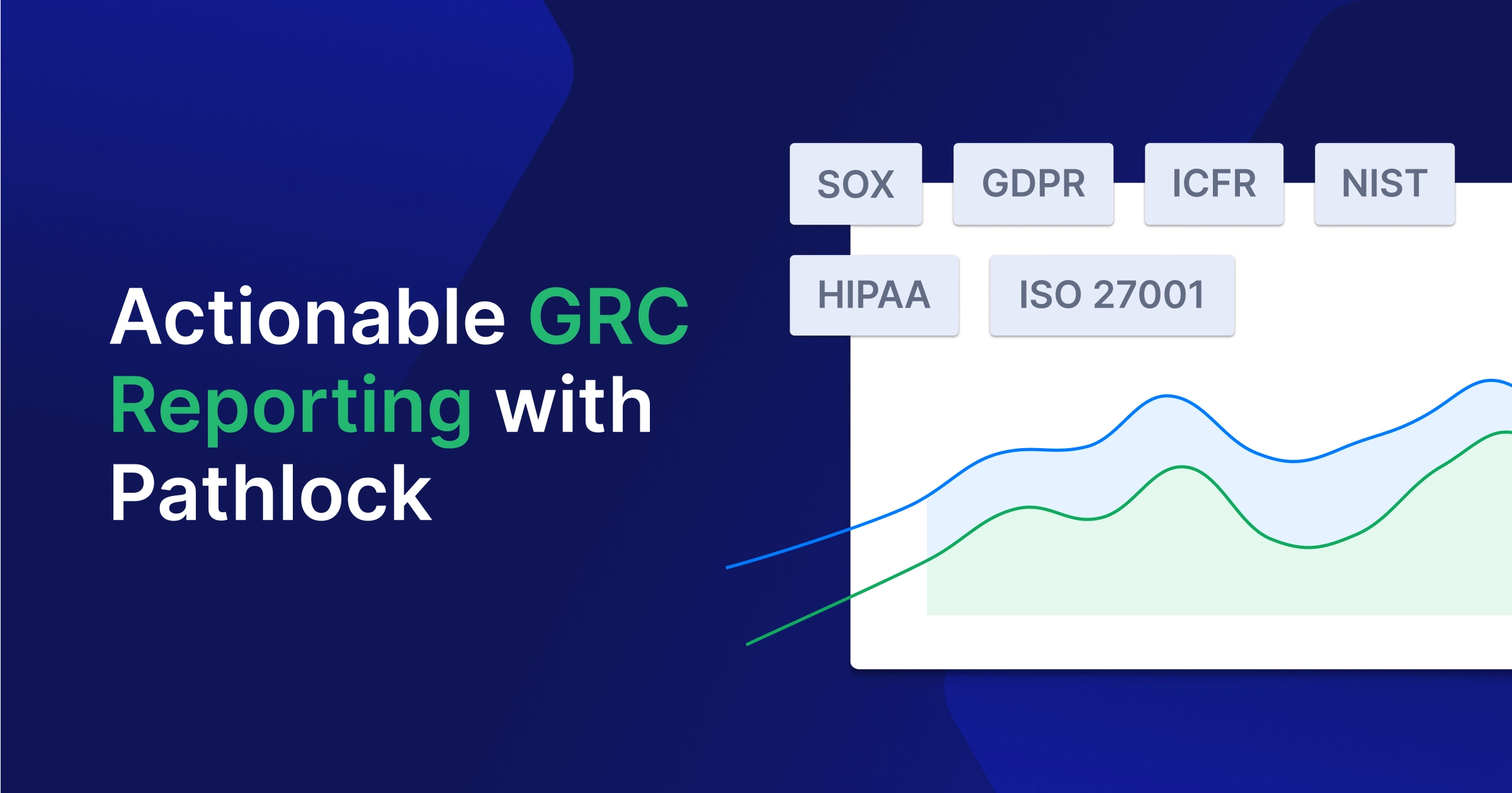
SAP IdM consolidates identity and access data for compliance reporting and audit trail by maintaining history of every change. Admins can generate reports on user access rights, role assignments, provisioning activities and policy violations across all managed systems. Auditors can verify who had access to sensitive systems throughout the audit period. SAP IdM supports regulatory requirements of SOX, GDPR, HIPPA, ISO 27001 with pre-built and customizable reports.
Standards-Based Support for Identity Federation
As organizations grow and move to cloud, identities need to securely integrate between different applications and service provides. SAP IdM support SAML 2.0, OAuth 2.0, OpenID connect, LDAP to seamlessly integrate identities across organizational boundaries.
Cross-Company Identity Management Scenarios
Using standards like SAML 2.0, SCIM, OAuth and OpenID connect, SAP IdM manages identities with partner organizations and B2B identity scenarios. Allows federated identity providers to authenticate users while local IdM system manages authorization.
Integration with SAP Single Sign-On
SAP IdM manages the user accounts and works seamlessly with SAP SSO solutions to provide a unified authentication experience. Users authenticate once and gain access to multiple SAP and integrated applications without repeated login prompts.
SAP IdM Architecture and Components
Identity Center
The Identity Center is the heart of the SAP IdM architecture and acts as central control point to manage workflows, tasks, data processing and governance across the enterprise.
Primary Component for Identity Management
Identity Center handles the execution of provisioning tasks such as user lifecycle management i.e. joiner, mover and leaver scenarios, Roles management and permission assignments, process business logic through workflows and approval chains. Here admins can also manage authentication and authorization policies, configure synchronization rules between connected systems and compliance related activities such as audits and reporting.
Centralized Repository (Identity Store)
The Identity Center contains a centralized Identity store which is a database where all identity related information is stored and it serves as the single source of truth. It stores comprehensive user profiles such as personal data, organizational attributes, employment details, and maintains role definitions such as business roles mapping with technical privileges. Identity store track’s identity relationships and activities with all the audit trails for compliance requirements.
Uniformed Data View
The Identity center provides a uniform and normalized view of identity data collected from multiple source systems. For example, HR data base might see a user by unique attribute “Employee ID” whereas the IT system see users by attribute “UserName”, Identity center maps these different formats into a single, consistent schema. Identity center eliminates data silos, duplicate records, administrators manage a user once and the changes are synchronized to all connected systems in respective formats. The uniform data view allows easy role modeling and access analysis with consistent policy management across different systems. As a result, administrators and auditors see one coherent identity profile per user, regardless of how many backend systems are involved.
Virtual Directory Service
The Virtual Directory service is a high-performance middleware component that enables SAP IdM to interact with multiple identity data sources without copying or replicating all data.
Logical Representation of Disparate Data Repositories
VDS provides a logical abstraction layer over multiple, physically separate data repositories such as LDAP Directories, RDBMS, SAP Systems and external identity stores. Instead of replicating all data into a single physical directory, VDS connects to these systems and presents them as single logical directory. When an application queries the VDS, it fetches the data from the source in real-time, transforms and maps attributes from different schemas on the fly and presents data back to the application in standard format. This reduces data redundancy while still allowing centralized identity processing.
Virtual Directory Tree
The VDS constructs a virtual directory tree which behaves like a traditional directory structure but is dynamically assembled from multiple backend systems. This unified virtual directory tree merges organizational units, groups and user entries from multiple sources, supports custom tree structures independent of the source system layouts, supports navigation and queries as if the user is accessing a single directory. For example, user identity attributes may come from an HR system, while authentication related attributes come from Active directory, all appearing as a single virtual user object.
Controlled Information Access
VDS enforces security policies on virtual directory access and provides granular access control based on requestors identity and attributes. Admins can filter sensitive attributes based on permissions, implement read/write data access depending upon system trust levels and source provider’s type. By controlling how identity data is accessed VDS ensures data security and privacy policies, maintains audit logs of all access attempts at attribute level for regulatory compliance.
SAP Cloud Identity Services
SAP Cloud Identity Services act as central nervous system for identity and access management (IAM) that enables organizations to handle identity activities in a secure, centralized and compliant manner across SAP and non-SAP environments. It is designed to support modern cloud, on-premises and hybrid enterprise infrastructure.
Supporting Cloud and Hybrid Environments
SAP Cloud identity services support SAP and non-SAP applications across different cloud providers. Hybrid identity federation can allow organizations to keep user identities on-premises while authenticating via cloud applications. It supports integration with non-SAP identity providers such as Microsoft Azure AD or Okta, allow users to use their corporate credentials to access SAP resources seamlessly. These flexible support mechanisms allow organizations to modernize identity management incrementally without disrupting their existing identity infrastructure.
Audit Reports and Compliance Support
SAP Cloud Identity services provide built-in capabilities to support security audits, regulatory compliance and governance requirements. Audit logs provide detailed tracking of every authentication event, user provisioning actions, authorization changes and administrative activities. Reporting dashboards makes it easier for stakeholders to such as executives, security teams, helpdesk and auditors to have full visibility of who accessed what, when and how. Reports and audit data can be exported in standard formats for external stakeholders’ analysis and regulatory submissions.
Capabilities
Authentication and Single Sign-On (SSO)
SAP cloud Identity services support SAML 2.0, OpenID Connect, OAuth 2.0, multi-factor authentication, risk-based authentication and comprehensive password policies across SAP and non-SAP applications. The goal here is to have one set of credentials with best password hygiene and user logs into identity authentication service once with multi-factor authentication and gain access to all authorized applications.
Policy-Based Authorization Management
Authorization events are driven by centrally defined policies and access is not just “yes” or “no”, it can be configured based on conditions. Using Attribute-based access control (ABAC) dynamic authorization decisions are taken based on user attributes, user coming from corporate network or public network, device status. Role based access control is used to map business functions to specific roles and users are assigned roles mixed with fine grained access controls, set on application level and data level authorization to ensure least privilege access to resources.
Identity Repositories
Identity repositories act as the source of truth, it stores user profiles, attributes and group memberships information. Identities are synchronized continuously from primary sources such as Active Directory, HR system, Azure AD to ensure that Identity repositories are always up to date to provide consistent identity data across applications.
Secure System and Data Access
Security controls are embedded into every layer of SAP Cloud identity services. Strong authentication mechanisms including multi-factor authentication and adaptive authentication, service ensure that even if credentials are stolen, data remains protected. API access is secured with token-based authentication, sessions are secured with TLS encryption, secure tunnel connection between cloud and on-premises systems and zero-trust architecture reduces the risk of unauthorized access or credential misuse.
Consistent Mechanisms
User Authentication
Instead of every application having its own login screen and security logic, SAP cloud identity services provide unified login page with consistent branding and user experience for all integrated applications. Standard protocols ensure same login process for every application with central password reset, account unlock, security questions, devices registration mechanisms.
User Provisioning
Identity provisioning service automates the lifecycle of users such as joiners, leavers and movers. Immediately creates users when they join organization, change their roles when user move across organization and they leave, access is revoked everywhere instantly.
Roles Assignment
Complex roles are built from reusable role templates mapped to business functions and users are assigned roles via group membership. Roles with temporary access can be created to allow temporary elevated access with multi-level approval workflow and access automatically expires after the defined period. It reduces privilege creep where users keep the old permissions they no longer need.
Authorizations Management
Centralized control with granular level permission management allows organizations to control what a user can actually do inside an application such as read, write or delete permissions. Organizations can define policies to detect and prevent conflicting authorization combinations i.e. segregation of duties (SoD), emergency access procedures with full audit trail and automate removal of unused permissions to ensure least privilege principle. Authorization reports provide visibility into who has access to what resource for easier governance, access reviews and continuous compliance monitoring.
Centralized User Account Management
SAP Identity services provide a single, centralized control point for unified administration of user accounts across the enterprise.
Administrative console: provides a single interface for user provisioning, role assignment, policy configuration, workflows configurations, bulk operations such as import and export of data, bulk data updates.
Reporting Dashboards: provide a clear overview of the entire identity landscape that reflect identities status i.e. active, locked, disabled, authentication and authorization activities.
Self-service portal: user can manage their profile, password, MFA devices and consent mechanisms independently.
SAP IdM Solutions and Integration
SAP Business Suite Integration (e.g., SAP ERP HCM)
SAP Identity Management integrates with SAP Business suite applications such as SAP ERP Human Capital Management (HCM) to synchronize identity and user provisioning data automatically. Changes in HCM automatically trigger user creation, modification or deactivate account in case of hiring, transfer and termination. Organizational hierarchies, positions and reporting relationships are synced and kept up to date, business roles are assigned based on user attributes e.g. job title, department and cost center. SAP IdM ensures that identity attributes such as name, email, job title, employeeID attributes remain consistent across SAP systems.
Integration with SAP Business Warehouse (Depending on Release)
Using SAP ABAP connector or SAP User Management (UM) connector SAP IdM can be integrated with different SAP BW versions. SAP IdM can synchronize Identity, role assignments and access data into SAP BW for advanced auditing and historical reporting. Compliance reporting can track who had access to what at any specific point in history, trend analysis can visualize identity growth, user access patterns and application license utilization over time.
Integration with SAP BusinessObjects Access Control (Depending on Release)
SAP IdM can be integrated with SAP BusinessObject Access Control to extend identity governance for risk detection and remediation capabilities. IdM provides user and authorization data to Access control for Role designing according to risk rules and ensure that role assignments don’t violate organizations polices such as segregation of Duties. Access control can trigger remediation workflows in IdM according to risk exceptions and together they maintain a stronger compliance posture in accordance with enterprise level risk models and centralized governance policies.
SAP Cloud Identity Solutions
Identity Authentication Service (IAS)
SAP cloud identity provider service handles how user authentication such as use of multi-factor authentication, adaptive authentication, SSO, social logins and corporate Identity providers. With branded, unified login screens for all integrated applications it provides a better and seamless experience.
Identity Provisioning Service (IPS)
Identity Provisioning Service automates user provisioning and lifecycle synchronization between source and destination identity providers for both cloud and on-premises applications. It creates,
SAP Cloud Identity Access Governance (IAG)
Workflow Management
Customizable workflows allow configurable approve process for access requests such as when the request should trigger and when it gets auto-approved based on pre-defined criteria. Multi-level approval support allow sequential and conditional approval chains. Tracking of workflow requests for both requestors and helpdesk with notification via email.
Risk Checks
Real-time analysis of access request against risk policies before approval such segregation of duties, compliance requirements pre-configured rules. Continuous monitoring for risk assessment of existing access rights with complete audit trail of activities that may link to identified Risks.
Emergency Access Management
SAP Cloud IAG provides firefighting capabilities for cloud systems, allowing time-bound elevated access with full audit logging to deal with emergency situations. Privilege sessions can be tracked and monitored during emergency access and post access documented reviews can fulfil regulatory requirements as well.
SAP Access Control
Risk Identification and Minimization
Centralized risk repository to maintain risk rule sets after scanning user roles and permissions to identify segregation of duties and critical action that may violate risk policies. Risk simulation to analyze what-if scenarios for access changes, cross-system risk analysis and managing mitigation activities with compensating security controls.
Workflow Automation
Automated workflow routing to multi-level approvers based on request type, risk level and organizations rules with support of automatic escalation for overdue approvals. Integration with external workflow systems and SLA tracking with comprehensive reports on approval cycle times.
Access Request Management (ARM)
Self-service portal where users can request for access such as single or multiple roles in a single request, which then follows a compliant approval process. ARM suggests appropriate roles to end users based on user attributes and users can track their access requests.
Access Risk Analysis (ARA)
ARA provides compliance reports after periodic analyses of users access rights, identify SoD conflicts and policies violations. It supports User access certification campaigns, assigns risk scores to access rights combinations and provides historical view of compliance posture over time.
Emergency Access Management (EAM)
EAM manages temporary privileged accounts access with comprehensive logging of all actions performed during emergency access. Designates oversight personnel to monitor emergency access sessions with system enforced expiration of emergency privilege and generates audit-ready reports after emergency sessions.
Business Role Management (BRM)
It provides the tools to create and maintain business roles, analyzes user business authorization and suggest role definitions. Simulates roles to detect any risks before role deployment and simplifies the role lifecycle with versioning and change control in role definitions.
SAP Single Sign-On
End-to-End Authentication (SAP and Non-SAP)
SAP Single Sign-On provides enterprise level authentication solution enables seamless access across SAP and Non-SAP systems. Eliminates password figure for end user and provides a unified login experience where users can authenticate once and gain access to all integrated systems. It supports Kerberos integration, SAML 2.0 , smart card authentication, Biometric integration, Mobile SSO and supports SSP for older SAP systems as well.
Benefits of SAP IdM
Increased Security
Security is one of the primary drivers for implementing SAP IdM, by centralizing and automating identity management processes, removing human error from the equation, organizations significantly reduce identity related risks.
Compliance and Automation of Identity Lifecycle
SAP IdM automates the identity lifecycle from employee onboarding to offboarding. When employees join, changes roles or leave organization, the system automatically provisions or deprovisions access rights based on pre-defined rules and policies. This eliminates delays in removing access for employees that are moving within organization or leaving. System enforces segregation of duties rules automatically and ensures compliance related to access w.r.t employee actual business status.
Central Management of Access Data
Instead of managing identities in different systems, all user access rights, roles and permissions across SAP or non-SAP connected systems are managed from a centralized access management system. Administrators have a 360-degree view of all users’ entire access footprint, and this extended visibility prevents shadow IT access, orphaned accounts and standing privileges.
Minimized Duplicate Administration
Without centralized administration each system requires manual administration and may lead to redundant account and policies creation that may get conflicting results. With SAP IdM, users are created once and automatically provisioned to all connected systems, reducing administrative overhead with consistent policies enforced everywhere.
Secure Passwords
SAP IdM enforces global password policies uniformly across all managed systems that ensures minimum length, complexity and expiration requirements. The system provides self-service password reset functionality to reduce helpdesk load while maintaining security through security questions and multi-factor authentication.
Accelerated Provisioning
Faster User and Authorization Provisioning
Through role-based access control (RBAC), identities are provisioned based on business attributes such as department value, in single action rather than individual configuration on each system. As soon as user appears in HR database, configured workflows or scheduled jobs create user account in connected systems with appropriate roles and access rights.
Reduced Manual Effort
Automation of User Management Tasks
Repetitive tasks such as user provisioning, password resets, account unlocks, account disable, role assignments and access reviews are automated. Administrators are free to focus on strategic tasks such as forensic investigations, orchestration and remediation plans.
Improved Data Quality
Centralized Maintenance from Leading Sources
Accurate identity data is critical for security, governance, compliance requirements and data inconsistencies are one of the major causes of system errors and audit failures. SAP IdM acts as a hub that synchronizes accurate identity data between connected systems such as SAP ERP HCM, SuccessFactors, Active Directory. Data validation rules ensure that only complete and accurate information is synched and prevent errors in business processes.
Enhanced Compliance
Fulfillment of Reporting Requirements
Auditors require evidence that “who has access to what”, IdM provide that evidence with its built-in reporting and analytics capabilities that provide real-time visibility into access rights across the identity landscape. Administrators can generate reports showing who approved of a specific role, when it was assigned to an identity and why, making the audit season less painful.
Cost Reduction
Identity lifecycle automation directly improves operational efficiency and project cost, while the initial setup requires investment, the long-term return of investment is worth the effort.
Reduced Project Duration
During new system implementation or migrations, automated processes such as bulk user creation and provisioning can bring down project duration. Rather than starting from scratch, reusable workflow templates and approval processes reduce configuration time. IdM ability to handle both SAP and non-SAP applications eliminates the need for multiple identity management solutions.
Consistent IdM Operation
Standardized identity management process across all connected systems and applications reduce training cost, improve operational efficiency and cost. A unified platform means single set of skills for administrators rather than expertise in multiple tools. Lower complexity leads to fewer support tickets, less downtime and more predictable IT budget.
SAP IdM Implementation and Optimization
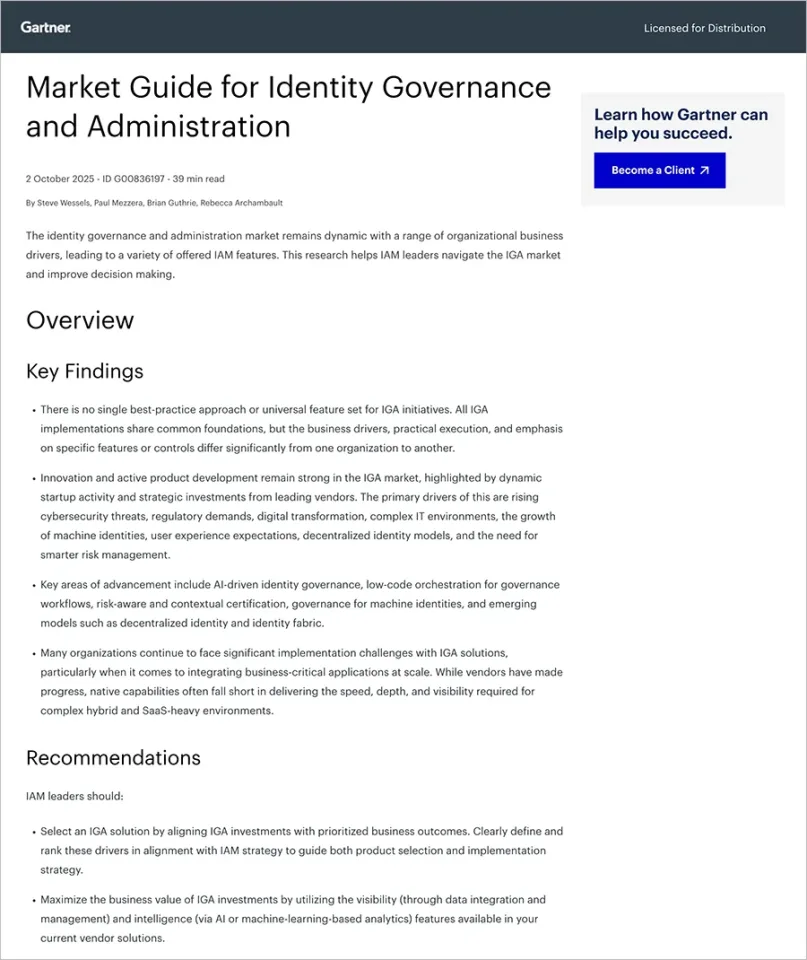
Since SAP announced the end of maintenance for SAP IdM at the end of December 2027, thou extended support will be available until 2030. Organizations are investing in both maintenance and strategic transformation by optimizing the existing setup and preparing transition strategies to modern platform like SAP cloud Identity services or Microsoft Entra.
Transformation Package for SAP IdM Replacement
Standardized Migration to New IdM Solution
A transformation package provides end-to-end migration approach from SAP IdM to modern Identity management platforms. This includes pre-defined migration strategy templates, phased transition planning, data migration frameworks, parallel operation periods and risk mitigation strategies to ensure that logic built in SAP Idm is translated efficiently to the new solution.
As-Is Analysis
A comprehensive assessment is required of current SAP IdM environment such as documentation of existing workflows, identity stores, provisioning rules, custom developments, system integrations, user roles and business processes. This phase helps in identifying redundant processes, technical debt and improvement opportunities in processes optimization.
Functionality Implementation
Once the target solution is defined, core functionalities are re-implemented such as user lifecycle management, automated provisioning/deprovisioning, approval workflows, access request processes, password management and business rule engines. Focus should be to replace custom logic with standard functionality where possible, simplify over complex workflows and improve automation levels.
System Connections
Re-establish secure connections to target systems such as S/4HANA, SuccessFactors, Active Directory using updated mechanisms like native connectors, APIs, Web Services to enable automated identity data exchange and provisioning.
Complete Rollout
Final phase starts with data and configuration migration, then start with pilot testing program and afterwards staged rollouts region or department wise. Important points in this stage are user training, communication plans, efficient helpdesk support, performance monitoring and swift handover to operations team.
Microsoft Entra Fit Check
Many organizations evaluate Microsoft Entra ID as potential successor for Identity governance and Administration (IGA) solution.
Assessing Suitability as an IGA System
Evaluate if MS Entra governance features such as Access Reviews, Entitlementn Management, role mining and privileged access management can handle complex SAP roles.
Technical Feasibility
Verify if the MS Entra provisioning mechanisms can bridge the gaps between SAP ABAP systems, hybrid identity management scenarios, connectors availability for non-Microsoft systems and integration with SAP S/4HANA.
Licensing Considerations
Analyze the licensing cost of Microsoft Entra Licensing tiers i.e. P1, P2 and add-ons. This includes features availability by license, cost per user and comparison with alternative solutions.
Connectors
Central Unit Communication with Connected Systems
Connectors are the functional arm of IdM system, allowing the central unit to communicate with connected systems having different architectures. Connectors like SOAP, OData, LDAP translate IdM commands into a language the target system understands.
Automatic Provisioning of Users (Onboarding and Offboarding)
Connectors ensure that when a new hire event occurs, the account is created in target systems in real-time with correct attribute mapping and transformation rules. In event of any employee leaving organization, connectors make sure that respective accounts are locked and assigned roles are removed across the connected systems.
How Pathlock Can Help
With SAP Identity Management (IDM) reaching end-of-maintenance in 2027, organizations must replace a foundational identity administration component that many SAP environments rely on for provisioning, workflow, and access lifecycle management. For large enterprises, this is not simply a tool replacement – it requires rethinking how identity and access are managed across complex SAP landscapes.
Pathlock provides a modern, SAP-native identity governance and administration platform designed specifically to address this transition.
Replace SAP IDM Without Losing Critical Functionality
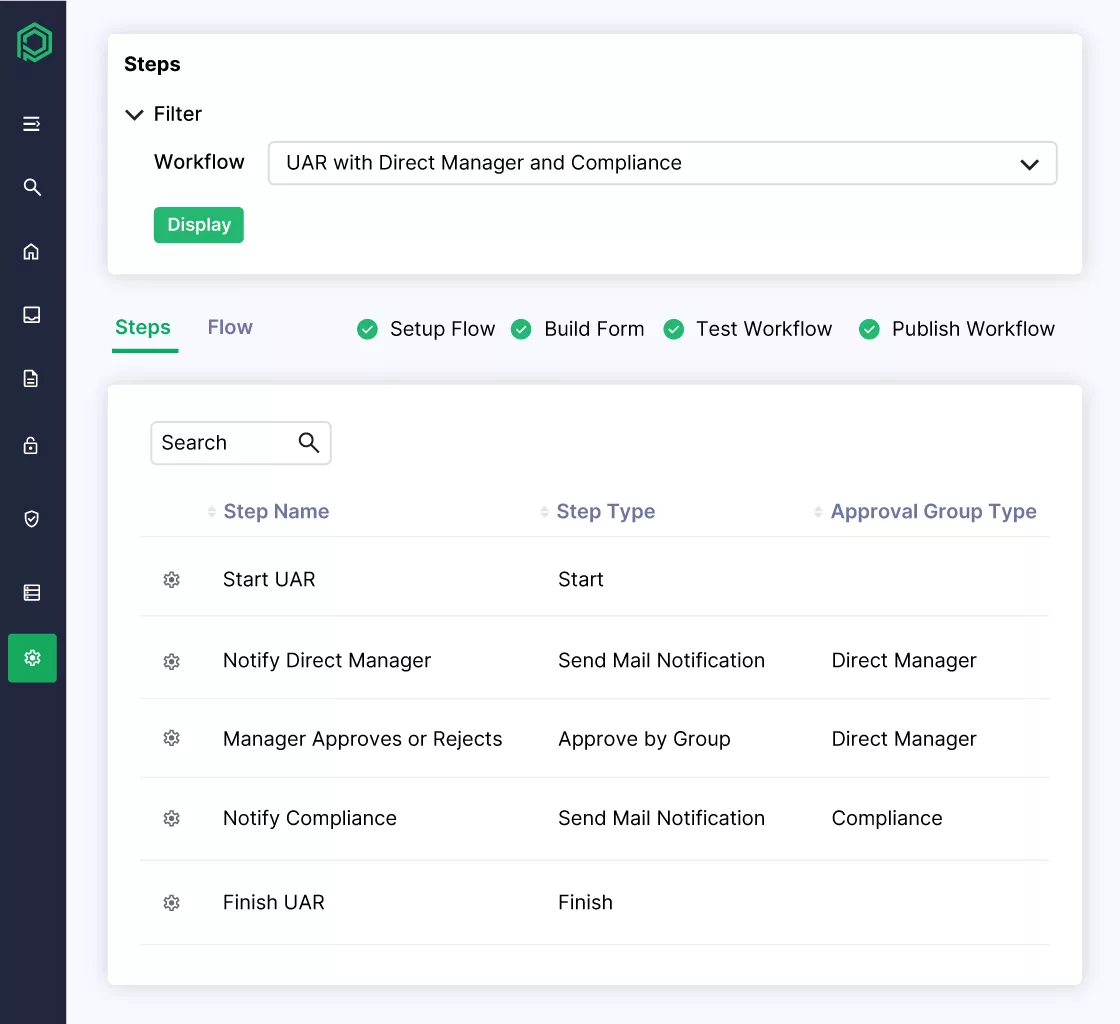
Many SAP IDM deployments support essential processes such as user provisioning, joiner-mover-leaver (JML) workflows, role management, and approval processes. Pathlock replaces these capabilities with standardized, configurable workflows that eliminate the heavy customization many organizations built into IDM.
With Pathlock, organizations can modernize identity lifecycle management while maintaining the operational processes their business depends on.
Simplify Identity and Access Architecture
SAP IDM environments are often combined with multiple additional tools such as SAP GRC, identity governance platforms, and custom integrations. Pathlock consolidates these capabilities into a single unified platform that delivers identity governance, application access control, and compliance monitoring together.
This unified architecture helps organizations:
- Reduce tool sprawl and integration complexity
- Lower licensing and operational costs
- Streamline identity and access governance processes
Deliver SAP-Native Governance at Enterprise Scale
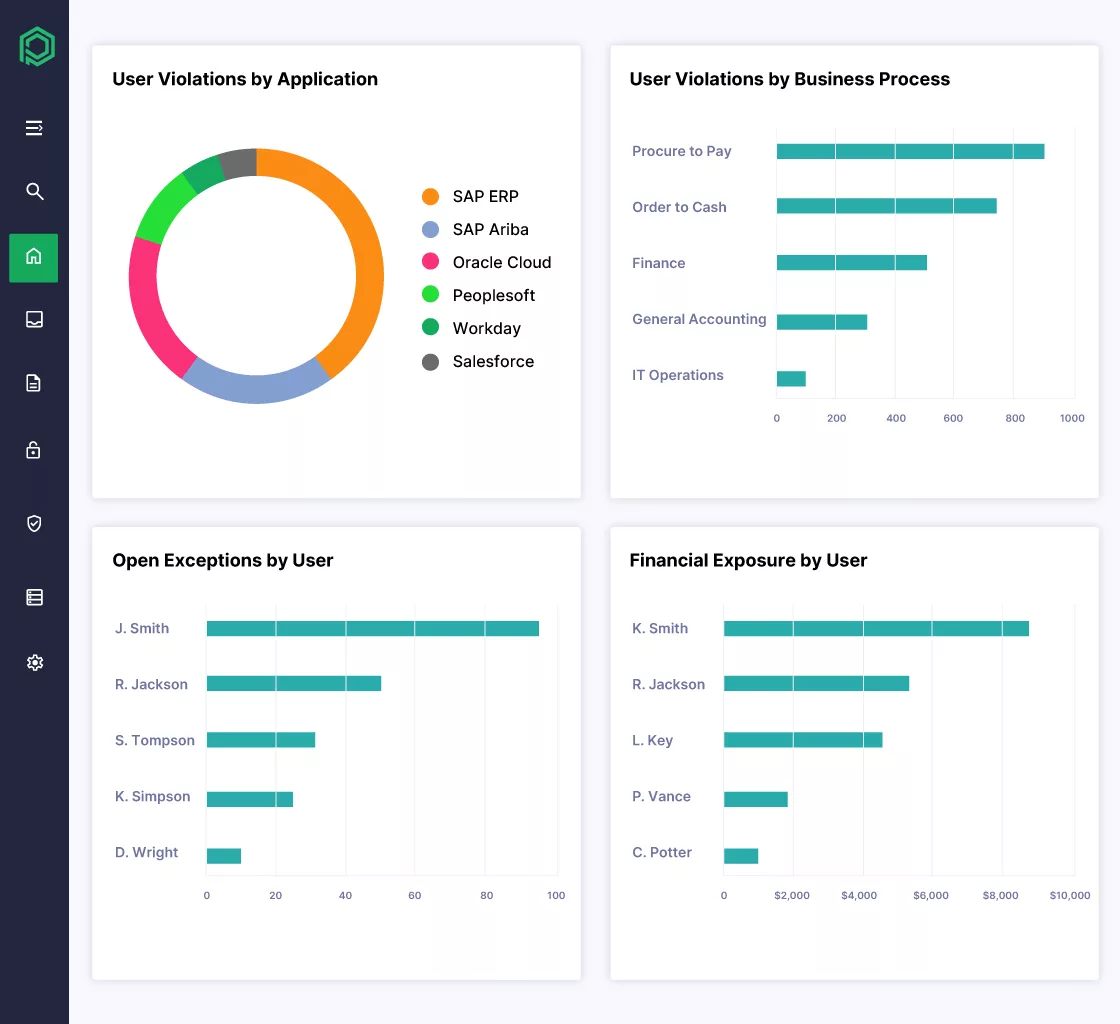
Generic identity governance tools often lack deep awareness of SAP authorization. Pathlock is designed specifically for SAP environments, with native support for authorization objects, roles, profiles, and transactions across systems such as SAP ECC and S/4HANA.
This SAP-native approach enables organizations to:
- Govern complex SAP authorization models
- Automate provisioning across multiple SAP systems
- Maintain strong compliance and audit controls
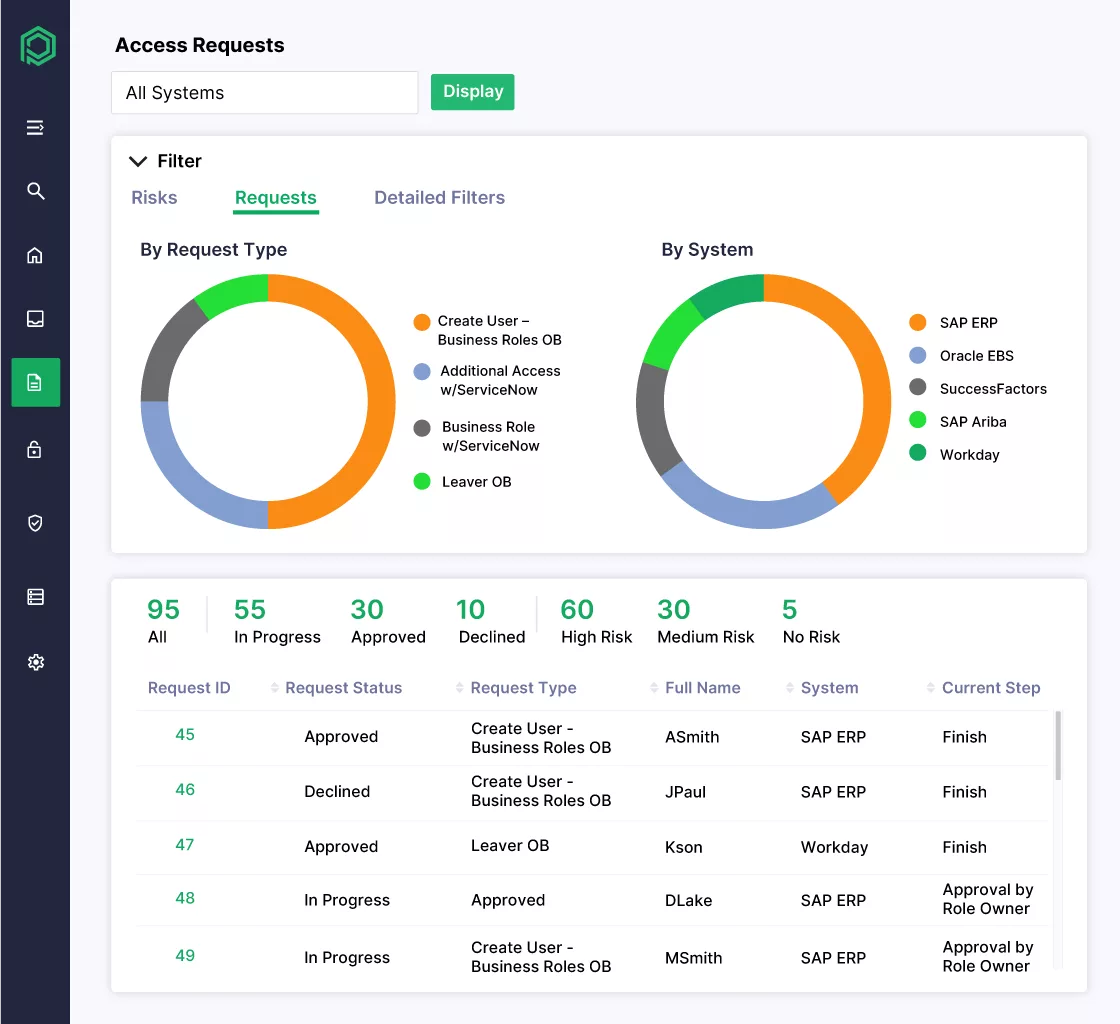
Enable Seamless Migration from SAP IDM
Replacing IDM can be risky because many enterprises rely on it to support automated provisioning and critical business processes. Pathlock provides a structured migration approach that preserves workflows and maintains operational continuity during the transition.
This phased approach allows organizations to modernize their identity infrastructure without disrupting day-to-day operations.
Future-Proof Identity Governance
As SAP environments evolve toward hybrid and cloud architectures, organizations need identity governance that can scale across both SAP and non-SAP systems. Pathlock’s cloud-native platform delivers the performance, scalability, and flexibility required for modern enterprise environments.
By replacing SAP IDM with Pathlock, organizations gain a future-ready identity governance layer that supports SAP transformation initiatives while strengthening security, compliance, and operational efficiency.